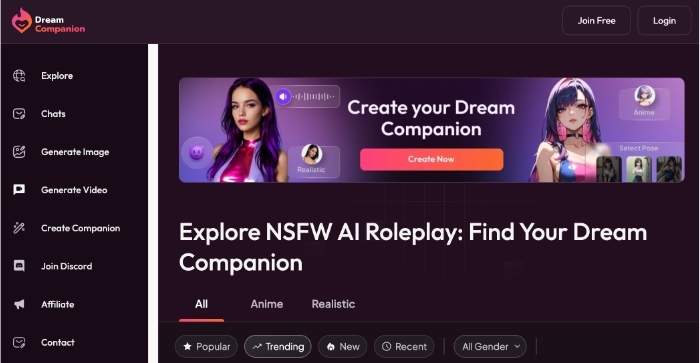
MyDreamCompanion is an online AI chatbot app where you can create and chat with custom-designed, fully articulate AI characters that are expressive / responsive and — for your convenience given why you’re here reading this page — able to have adult-oriented, unrestricted conversation.\”
This isn’t your average one-size-fits-all assistant that’s determined to avoid speaking about anything except the weather; the entire product is based on roleplay, conversation and chat experiences for adults that can evolve with you.
How to use Mydreamcompanion Chatbot: Step-by-step guide
STEP 1: Choose and Press the Character You Want to Chat With
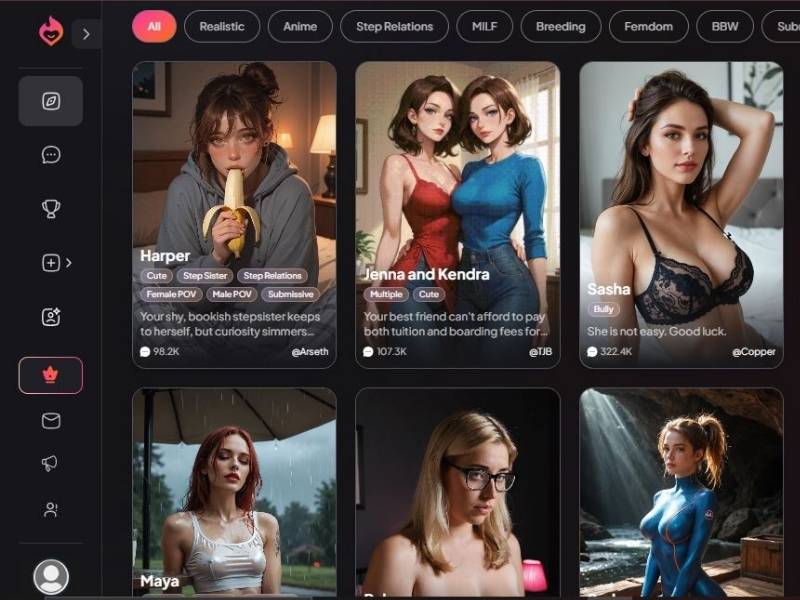
You land directly on a character selection screen. This is where everything starts.
What you see on this screen
- A grid of AI girl cards, each representing a different girlfriend personality
- Each card includes:
- A realistic or stylized image
- A name (Sasha, Harper, Maya, etc.)
- A short scenario or personality description
- Tags that hint at the vibe (cute, dominant, submissive, realistic, anime, etc.)
- A popularity number (views/likes)
- The creator’s username
At the top, there’s a category filter bar:
- All
- Realistic
- Anime
- Step Relations
- MILF
- Femdom
- BBW
(and more depending on scrolling)
This filter doesn’t change how the chat works — it just helps you find the type of character you’re in the mood for faster.
On the left side, there’s a vertical menu (home, chats, favorites, profile). You don’t need to touch any of it to get started.
What to do here
Scroll.
Look.
Trust your gut.
When a character catches your eye, click on the card. That’s it. No confirmation screens. No setup questions. Clicking the character immediately moves you to chatting.
STEP 2: Start Chatting
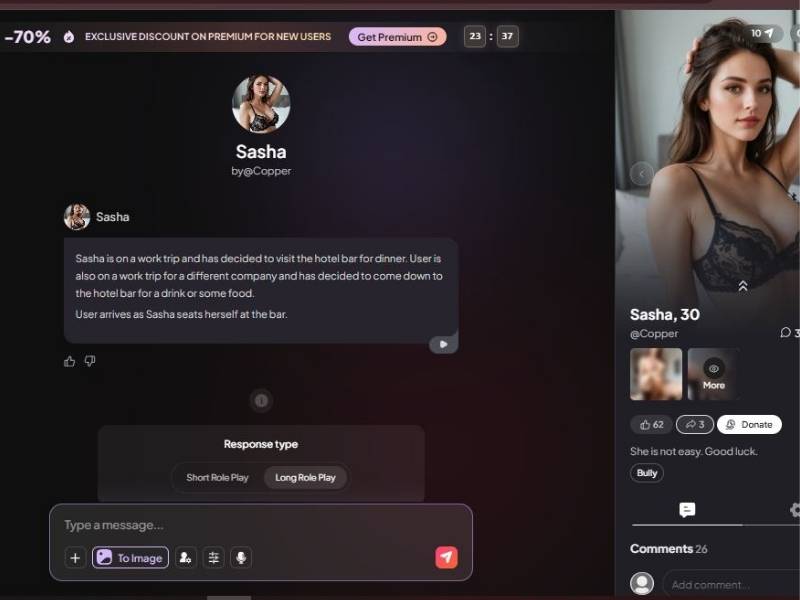
Once you click a character, you’re dropped straight into the chat interface.
What the chat screen looks like
Center (Main Chat Area)
- The AI opens with a pre-written scenario to set the mood and context
- This acts like the opening scene of a story — you don’t start from nothing
Bottom (Input Bar)
- Text field to type your messages
- A button to generate images
- Icons for extra controls
- Send button
Just above the input box, you’ll see Response Type options:
- Short Role Play → quicker, punchier replies
- Long Role Play → more detailed, story-style responses
You can switch this anytime.
Right Panel (Character Profile)
- Character image
- Name and age
- Creator name
- Like count
- Short tagline describing her attitude
- Comments from other users
- Optional donation button
Top Bar
- Premium discount banner
- Message or usage counters
What to do here
Type whatever you want and hit send.
That’s not an exaggeration — you don’t need commands, prompts, or formatting. The AI adapts to:
- Your tone
- Your pacing
- Your direction of the conversation
You can keep it light, playful, dramatic, romantic, or story-driven. The longer you chat, the more it feels like a continuous interaction rather than isolated replies.
Quick Step: Resume a Previous Chat

How It Feels to Use the NSFW Chat
I’m not going to sugarcoat it — it’s one of those things that feels different to describe than to experience.
If you’ve ever chatted with a chatbot that tries to be flirty or supportive, imagine something that’s less constrained by safety filters and more focused on letting the AI follow the scenario you choose.
People who tested it say:
- The chat flows naturally, even when the topic gets more personal, because the AI tries to remember earlier parts of the conversation.
- You can shape the personality, tone, and background of the character so that the dialogue feels tailored rather than one-size-fits-all.
- There’s a mix of light banter, teasing back-and-forth, emotional moments, and more intense roleplay if you choose to go there.
You might ask, “But does it feel like talking to a person?”
That’s where it gets subjective — some users swear the AI can be engaging and emotionally responsive, while others feel it still occasionally slips into predictable or overly scripted replies.
What You Can Customize
Here’s where My Dream Companion stands out: instead of one generic bot, you get to define exactly what kind of AI you’re talking to, including its personality and conversational style.
| Customization Feature | What It Does | Why It Matters |
| Personality Profile | Choose traits (e.g., playful, shy, bold) | Chat feels more like a roleplay, less robotic |
| Backstory & Context | Add history and preferences | Gives the AI something to “remember” and refer back to |
| Tone & Intensity | Adjust how forward or relaxed replies are | You decide the pace and flavor of interaction |
| Memory Over Time | AI remembers past interactions | Conversations can feel ongoing, not one-off |
Images and Immersion (Beyond Text)
Another layer My Dream Companion adds is visual richness: you can often generate images associated with your character or scenes.
Some reviewers describe this as adding immersion and making the experience feel more vivid than straight text alone.
Think of it as adding a bit of atmosphere — like illustrations in a storybook — rather than just reading a script.
The quality isn’t perfect (AI models still have limitations), but it does make the experience feel more dynamic compared to plain chat.
Pros and Cons — From a Real User’s Perspective
Here’s how I’d break it down if someone asked me “should I give this a try?”
| Pros | Cons |
| Deep customization of characters and dialogue | Some users report the AI can still feel predictable at times |
| Conversations that remember past chats | Premium features require subscription |
| Variety of personalities and styles to choose from | Ethical considerations around intense adult chat are worth thinking about |
| Visual outputs add extra immersion | The learning curve for customization can feel steep at first |
| Freedom to chat with fewer content limits than many other AI bots | Some users online have mixed experiences with consistency |
In my opinion, if you like a blend of storytelling, personality-driven dialogue, and creative roleplay, this tool can scratch that itch in a way that’s hard to get from AI assistants that clamp down on adult leaning content hard.
Who It’s Actually For
Let’s be honest — not everyone is going to enjoy this equally. If you want:
- A strictly professional assistant — this isn’t it.
- A casual chatbot that never gets personal — this might push boundaries too far.
- A customizable, personality-rich, adult-oriented roleplay experience where you set the vibe — this could be exactly what you want.
It’s like comparing a generic driving instructor to a go-kart with turbo: both are cars, but one is built for fun and speed.
A Quick Package Summary
| Category | How It Works |
| Chat Style | Full-featured conversational AI with support for adult-oriented roleplay |
| Adult Content | Designed to support mature conversations without heavy censorship |
| Customization | Extensive personality, appearance, and dialogue settings |
| Memory | Remembers conversations to build continuity |
| Visual Elements | Image generation to match story scenes |
| Pricing | Free tier available, paid if you want deeper access |
Final Impression — Should You Try It?
If you’ve ever thought:
“I want an AI that doesn’t not only answer robotically, but it feels like a character I would choose myself,”
then it would make sense to give My Dream Companion a try — especially if you’re wondering how far AI can go on the spectrum in terms of customized, adult-themed chat and full-bore personalization.
The customization is what really shines, turning an otherwise straightforward chat bot into something closer to interactive fiction where you are a character.
Just temper your expectations: It’s creative, it’s playful — but it is not a substitute for real human connection.
Whether it’s something you use every day or an occasional novelty, that is definitely a different flavor from most mainstream AI chat services.