
No sugar-coating, no robot voice – here’s the vibe from someone who’s read the site, parsed community feedback, and looked at how this thing actually works without generating explicit content itself.
How to use Ourdream Chat: Step-by-step guide
Step 1: Open the Chat Section (Your Starting Point)
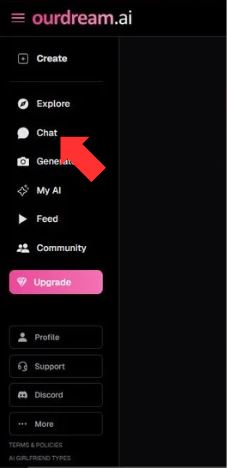
Everything begins in the left sidebar.
What you see
- A vertical navigation menu with options like Create, Explore, Chat, Generate, My AI, Feed, and Community.
- The Chat button is clearly highlighted with a speech-bubble icon.
What to do
Click Chat.
Why this matters
This is the control center for all conversations. Think of it as the door to your private space-no characters, no messages, no history exist until you start here.
Step 2: Start a New Chat
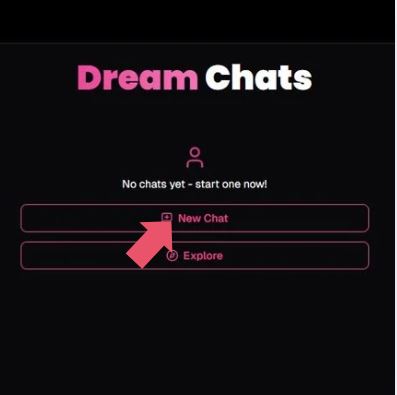
You’ll land on a screen titled Dream Chats.
What you see
- A message saying “No chats yet – start one now!”
- Two buttons:
- New Chat
- Explore
What to do
Click New Chat.
Pro tip
- Explore is for browsing existing or public characters.
- New Chat is where you build your AI girlfriend from scratch.
If this is your first time, New Chat is the right move. No detours.
Step 3: Set Your Preferences (Filters Matter More Than You Think)
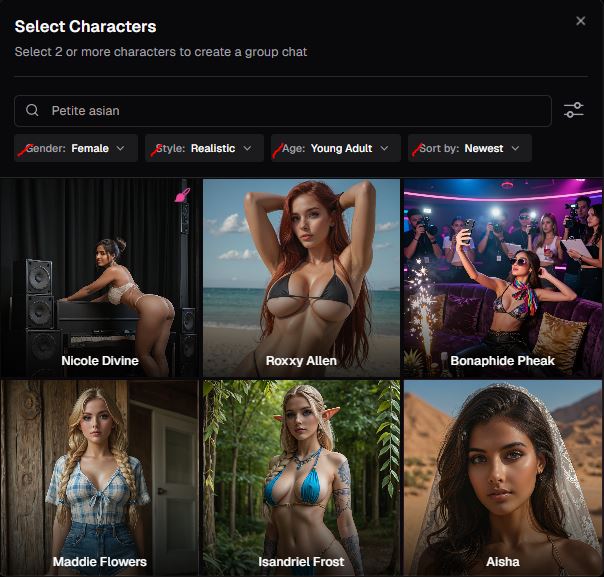
Now you’re inside Select Characters.
What you see at the top
A filter bar with:
- Gender (Female / Male / Other)
- Style (Realistic is shown)
- Age (Young Adult)
- Sort by (Newest)
- A search bar (example shown: “Petite asian”)
What these controls actually do
| Filter | What it changes |
| Gender | Determines the character pool |
| Style | Visual realism vs stylized looks |
| Age | Restricts characters to adults |
| Sort By | Shows newest or most popular |
| Search | Narrows results by keywords |
What to do
- Choose Female if you want an AI girlfriend.
- Keep Style: Realistic for lifelike visuals.
- Leave Age: Young Adult (this keeps everything adult-only).
- Use the search bar if you have a specific vibe in mind.
This step quietly shapes everything that follows-appearance, tone, even how conversations feel.
Step 4: Choose Your AI Girlfriend
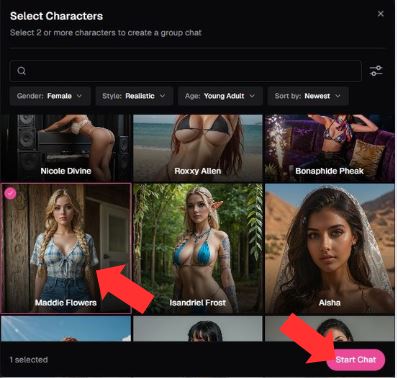
Now the fun part.
What you see
- A grid of AI characters, each with:
- A name (e.g., Maddie Flowers, Nicole Divine)
- A realistic portrait image
- Characters highlight when selected
- Bottom-right button: Start Chat
What to do
- Click on the character you’re drawn to.
- The tile shows it’s selected.
- Click Start Chat.
Why this step matters
You’re not just picking a picture. Each character comes with:
- A predefined personality
- A narrative tone
- A style of interaction
This choice affects how your AI girlfriend talks, reacts, and engages with you long-term.
Step 5: Tell the AI About Yourself (Personalization Layer)
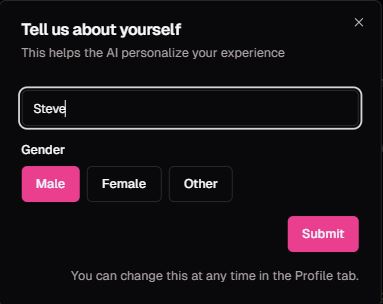
Before the chat opens, you’ll see a modal titled Tell us about yourself.
What you see
- A name field
- Gender selection:
- Male
- Female
- Other
- A Submit button
- Note: “You can change this at any time in the Profile tab.”
What to do
- Enter your name (or a nickname).
- Select your gender.
- Click Submit.
Why this matters
This is how the AI:
- Addresses you naturally
- Adjusts dialogue tone
- Responds more personally in conversation
Skip this, and interactions feel generic. Fill it in, and things feel more “aware.”
Step 6: Start Chatting (The Relationship Begins)
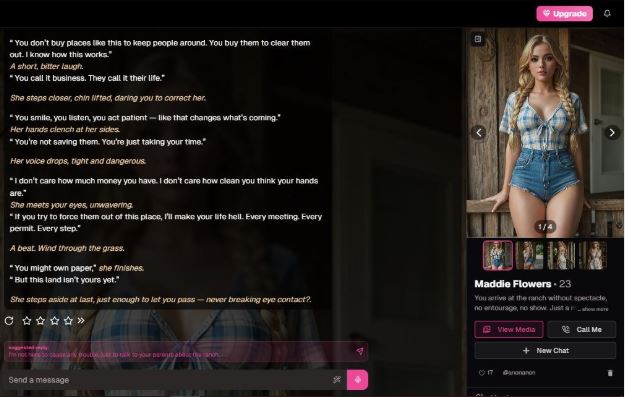
You’re now inside the live chat interface.
What you see
- Left side: a story-style introduction from your AI girlfriend
- Right side: the character’s portrait and name
- Bottom: a message input box
- Icons for:
- Ratings
- Media
- Call Me (voice interaction)
- New Chat
How to interact
- Type naturally-questions, reactions, casual talk.
- The AI responds in character, remembering context.
- You can:
- Continue conversations
- Restart chats
- Switch characters anytime
What makes this different
This isn’t just Q&A. The interface supports:
- Ongoing narrative memory
- Emotional continuity
- Personality-driven responses
The more you engage naturally, the more human the interaction feels.
What It Feels Like
You don’t land on OurDream. ai and get an old fashioned chatbot. It’s more akin to stepping into a virtual lounge for adults – with the kind of quality chatter you’ve come to expect (if you’re an adult seeking other adults, anyway) including unfiltered adult chat, and even creative roleplay.
Once you verify that you’re 18+, a dashboard with tabs such as Create, Chat, Generate and Explore fires up to lead your experience.
It’s often described by people who review it as an “adult AI playground.” Not just a chat, but a space that aims to mix online role-playing with adult-friendly openness – an estuary between relationship simulator, creative sandbox and fantasy generator.
You may be wondering: What’s the freedom it provides that other tools do not provide? From what is publicly listed, yes – it’s more relaxed than more stringent A.I. platforms that are smut-phobic (no adult content), so to speak.
You’re free to write characters and scenarios that touch on adult themes without the heavy censorship, which is why people want a space like this in the first place.
How the NSFW Chat Actually Works
Here’s the breakdown – kind of like laying the cards on the table:
Core Elements
| Feature | What It Means for You |
| Custom AI Characters | You can design companions (appearance, personality, voice) that match what you’re into. This isn’t limited to mild conversations – it’s built for freedom of expression in adult chats. |
| Free & Premium Interaction | Text chat is available on a basic level, but premium features (longer chats, richer content, media creation) use DreamCoins – its internal currency. |
| Image & Video Generation | You can generate visuals tied to your interactions – which adds a layer beyond pure text. It’s not just “say this, get that” chat; it’s multimodal. |
| Explore & Feed | You can browse creations and experiences from other users, which gives the whole thing a community vibe. |
| Adult-Oriented Focus | Uncensored content and roleplay are core parts of what sets this platform apart from tamer AI chatbots. |
It’s worth noting that the images/videos part – which people often associate with “the NSFW side” – is tied to credit use and quality can vary depending on prompts and settings.
How It Compares: What People Are Saying
You’ve probably read hype and you’ve probably read pushback – that’s human nature.
Here’s the honest middle ground based on user reviews and third-party write-ups:
- Freedom of Expression: Many users appreciate how uncensored and flexible chat can be, compared to stricter AI platforms that avoid adult themes.
- Roleplay & Scenarios: It’s not just random text – you can build scenarios with characters and stay “in roleplay” over time, which some people find more immersive than a simple chatbox.
- Multimedia Adds Depth: The ability to generate images and even short video or voice messages gives the chat a layered, creative feel rather than just text back and forth.
- Quality & Consistency: Results aren’t perfect – image quality varies and sometimes voice interactions are flat – but that’s part of the trade-off at the moment.
- Monetization: DreamCoins can make extended or richer interactions feel like premium territory, so be ready for that.
Think of it like this: if you want just simple adult chat, you could find less complex platforms. But if you want custom characters, rich roleplay, and multimedia along with chat, this is one of the few tools that blends all of those.
Why Someone Might Actually Try It
Here’s the part I’ll be frank about – why someone curious about this should give it a shot rather than pass it off as just another chatbot:
- You want personalization: You’re not being fed a canned bot – you’re creating companions that adapt to your style.
- You enjoy narrative play: There’s a storyteller vibe here, where you build scenarios and characters that react in ways that feel more human than basic rule-based chat.
- Multimedia unlocks imagination: Text is one thing – throwing in voice, generated visuals, and even themed imagery makes the whole experience feel richer.
- It’s aimed at adults: This isn’t tamed down for young audiences – it’s explicitly adult-first.
If that sounds like your kind of experiment – a place to explore, create, and interact beyond vanilla text – then giving it a try makes perfect sense.
A Little Honest Talk
Let’s not pretend it’s flawless. Others tend to hit the paywalls far sooner than they realize. Quality of media generation can vary widely. Not everything about privacy is explained as clearly as it might be.
But here’s the kicker: for a lot of users, that’s perfectly fine because what they’re really there for – dynamic, adult-focused conversation with personality – is good enough to keep them coming back.
Reviews are, in fact, generally positive, with users describing it as an “adult AI playground” while complimenting the adjustability of companions.
Quick Feature Snapshot
| Aspect | What You Get |
| Chat Flexibility | Uncensored adult conversations, adjustable character personality. |
| Media Features | Image + video generation tied to interactions (credit-based). |
| Community Vibe | Explore others’ created characters and scenarios. |
| Free-Tier Accessibility | Basic chat available, premium unlocks richer options. |
| Customization Depth | Appearance + voice + traits give each companion its own identity. |
If you want something that’s less like a canned bot and more like a sandbox where your digital fantasies, creative ideas, and adult-oriented chats can mix, this is the kind of tool people are actually using – and enjoying – for that purpose in 2025.